Query Commander · 


Works with AWS Lambda!
You can install Query Commander in your AWS environment and run it completely serverless. Upgrades/Downgrades are simple using AWS Lambda layers. Check out more on the AWS Lambda installation page.
Introducing Query Commander, the opensource browser-based SQL tool designed for secure and efficient database management.
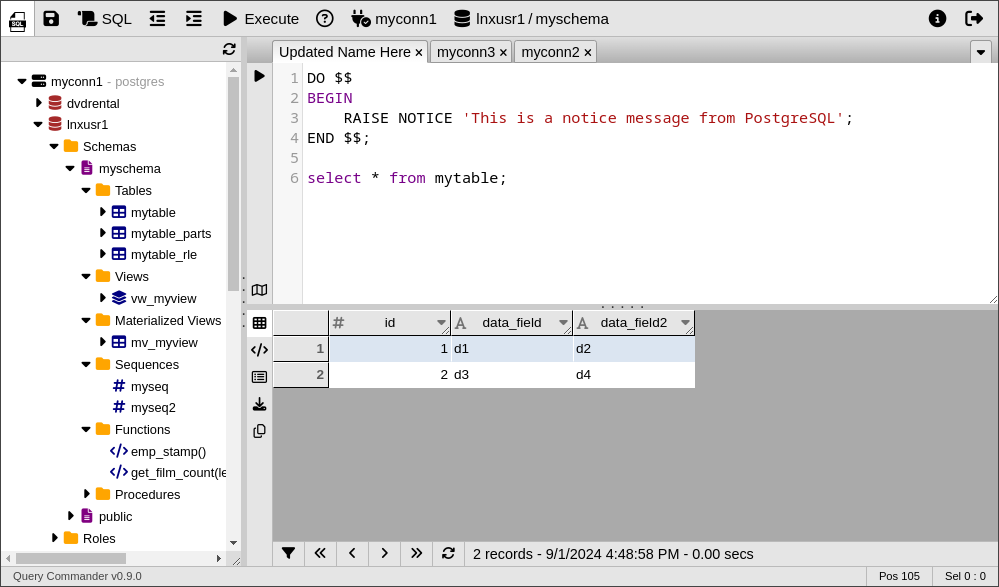
Features:
-
Database Connectivity
- Support for multiple server connections and heterogeneous targets
- Support for multiple database types:
(Oracle, PostgreSQL, Redshift, MySQL, Trino, Presto, etc.)
-
Database Management
- Viewing of database objects
- Browse Schemas
- Data export capabilities
- Explain Plain visualization
-
Metadata Access
- View table structures, constraints, indexes, relationships, roles, and permissions
- Generate ddl for views, materialized views, procedures, functions, and much more
-
User Interface
- Intuitive, familiar, and user-friendly interface
- Browser-based multi-tab and multi-window interface
- SQL Editor: Custom SQL Execution and results display
- Syntax highlighting
-
Enhanced Security
- Support for End-to-End Encryption
- Multiple authentication options (Database login-based, LDAP/Active Directory)
- Optional time-based rate limits for queries executed and/or total records retrieved by user
- Advanced permissions management with "Persona proxies" and group-based authorization
- Ideal for cloud-hosted and remote database server access
- Support for AWS Secret Manager for secure credential storage and database server info
-
Modern Hosting Options
- Traditional installation with CGI executions
- Optional Serverless installation
Serverless Hosting
Serverless hosting in AWS leverages the combination of S3 file storage for static objects, API Gateway + Lambda for backend processing, DynamoDB for secure token storage, and Secrets Manager for encrypted password management.
SECURITY: SOX and HIPAA Compliance
By enabling LDAP authentication Query Commander can leverage "Persona proxies" which allow for linking role-based access in the database to users authenticated via LDAP.
Persona proxies (a.k.a. role-based service accounts) eliminate the need for users to be individually created/maintained inside the database. This feature can save time being wasted on database account management and access pruning which can be significant depending on the size of your userbase.
Installation
» Check out the Apache 2.x and AWS Lambda installation options.
General Installation
For local installations the easiest way to get started is to use pip as shown below:
pip install querycommander
The above installs the basic software with no built-in connectors. To install specific connectors or components use one or more of the following commands:
# Database Connectors
pip install querycommander[postgres]
pip install querycommander[mysql]
pip install querycommander[oracle]
pip install querycommander[redshift]
pip install querycommander[trino]

# Other connectors
pip install querycommander[aws] # For DynamoDB, S3, and SecretsManager features
pip install querycommander[redis] # For Redis session token storage
pip install querycommander[ldap]  # For LDAP authentication

# Install everything in one command
pip install querycommander[all]